Slack allows you to connect with your remote team, whether you work from home, a coffee shop, or an ethereal hotel in the Maldives.
Being part of a distributed team is the “future of work” we crave and call for. But this setup has “present” struggles. One of such is efficient communication via Slack.
With teammates working self-set hours and in different time zones, it becomes imperative to establish rules to ensure minimal communication hiccups.
For this collaborative guide, we spoke to remote workers to get the essential Slack best practices for remote teams. Read, hit the bookmark button, and share this guide with your team for improved Slack communication.
Why Remote Teams Should Learn to Use Slack Effectively
Trends reveal that interest for the Slack app spiked between the 15th and 21st of March, 2020—the peak of the COVID-19 pandemic that ignited the remote work revolution.
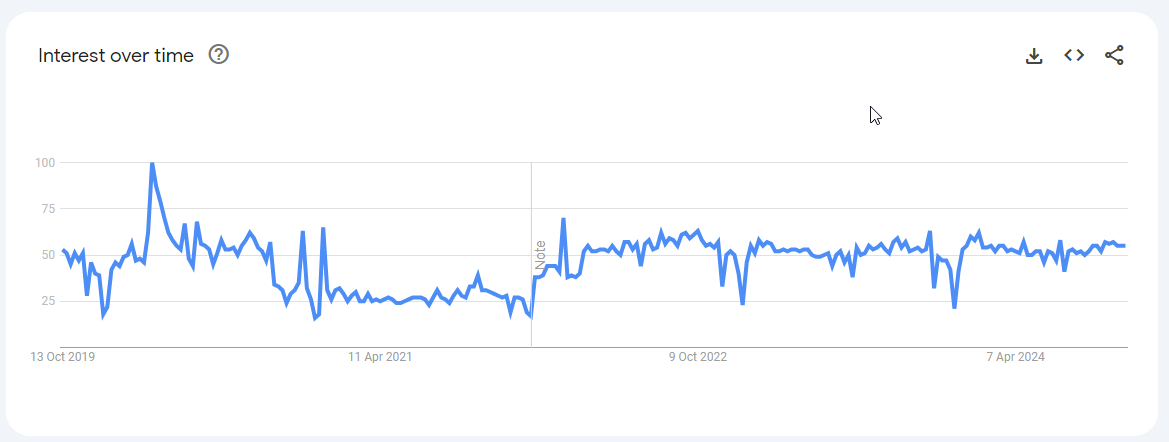
Source: Google Trends
Ever since Slack has become “the Google” for remote team messaging.
Slack is a low-pressure way of communicating with remote team mates all over the world. But only when used correctly. Used right, Slack can make remote work feel less isolating and more fun!
Common Slack Struggles Remote Teams Face
Some Slack struggles for remote teams are pretty common. But what are they?
There’s Information Overload and Notification Fatigue.
Slack makes you “hear” every public conversation through notifications, even if the info isn’t relevant or urgent. But endless pings can do more harm than good. As Deepak Shukla, CEO of Pearl Lemon puts it: “It’s easy to get sucked into a vortex of endless notifications!”
For Sharan Phillora, Senior Content Writer at dslxcontent, the red notification count is a real pain. “The worst part is that when I’m back from a vacation, I need to read through everything in case I’ve missed anything or save it for later.” She tells CultureBot that ‘Saving for later’ further ramps up the notification count, and makes her anxious.
It’s Difficult to Maintain Work-life Boundaries.
With remote work, the freedom to set your own hours is great—until it’s not. Flexible schedules can quickly blur the boundaries between work and personal life, so your mind is “always on”. When your workspace is also your living space, it’s hard to fully disconnect, making you feel like you’re never truly off the clock.
There’s a Lack of Clear Guidelines for Channel Usage.
When Slack channels are a free-for-all, important messages can easily get buried under a mountain of irrelevant chatter. If all types of conversations (updates, project discussions, and casual conversations) happen in one place, crucial information can get lost. Lack of structure leads to wasted time as team members scramble to find key details buried in general discussions.
It’s Hard for the Team to Bond Outside Work.
In an office, casual chats by the Coffee machine or during lunch help build rapport. Remote teams miss out on these spontaneous moments, leading to a more transactional feeling. Without casual interactions, it’s harder to connect on a personal level, which can leave team members feeling isolated and disengaged.
6 Remote Team Best Practices for Slack Channel Organization
A clear and organized Slack channel structure ensures that everyone knows exactly where to go for what. This section highlights 6 best practices for remote teams.

Source: Teamwork
1 — Start The Essential Channels
- #general. Use this for company-wide announcements and general team discussions.
- #announcements. A dedicated space for important updates or policy changes. This channel should be limited to essential messages.
- #random. This is a must-have for informal conversations that don’t belong in work-related channels. (More on this later)
- Department-Specific Channels. Channels like #marketing, #engineering, or #support allow teams to have focused discussions within their areas of expertise without clogging up broader channels.
2 — Use Descriptive Channel Names
Rather than vague names like #projects, a more specific name like #proj-client-launch-2024 tells team members exactly what the channel is for.
In the same vein, use channel prefixes that group similar channels. For example, using #proj- for all project-related channels (e.g., #proj-marketing-campaign) helps organize conversations by type. Similarly, prefixes like #team- for department channels or #client- for customer-specific channels create consistency and make it easier to sift through the workspace.
3 — Create “Decision-only” Routes
Making “decision-only” routes worked well for the team at Fuel Logic LLC, a Texas-based company specializing in comprehensive fuel management solutions.
CEO, Eliot Vancil tells CultureBot: “We only use these channels for final choices and important actions. Decision-only routes cut down on noise and ensure that important news gets noticed during small talk.”
4 — Create “Problem-solving” Channels
“I suggest creating “problem-solving” channels for important channels that are only used for fixing common problems”, says Vancil.
“This will create a place where people can go to get real-time answers without having to start separate threads. These focused methods help our Fuel Logic remote team keep Slack clean and useful.”
5 — Keep Separate Channels for your Internal and Client Teams
Bringing on external clients into your teams’ Slack can increase the complexity of communication. Hence, you need separate channels for internal and external teams. To avoid confusion, Phillora suggests different naming conventions for the two groups.
“For example, your internal group could be [emoji] + [client name] whereas your external channel could be only [client name]. Even though there is usually a drop-down for internal and external channels, it can get confusing; especially if someone is in multiple channels with similar names.”
6 — Use Threads to Avoid Channel Clutter
Grouping messages in threads rather than responding directly to the channel is good Slack practice. Will Yang, Head of Growth and Marketing at Instrumentl explains that threading properly is a small change that greatly impacts the productivity of teams.
“For example, If someone asks a question in a channel, I’ll reply directly to their message with my answer. Others can then chime in by replying in that same thread. This means the original question and ensuing conversation stay together, rather than getting lost in a flood of other messages.”
How to Establish Slack Communication Guidelines
By setting up a few ground rules, remote teams can ensure that Slack interactions remain respectful and organized. Without clear guidelines, conversations can become chaotic. Guidelines make for buttery communication that drives real business results.
Set Expectations for Response Times
One of the most important aspects of remote communication is setting expectations around response times and availability. Remote teams often work across different time zones, so it’s crucial to clarify that not every message requires an immediate response.
“At DSLX, we are considerate about our teammate’s time zones and always encourage scheduling texts in advance.” Senior Content Writer, Phillora tells us.
To avoid misunderstandings, it’s also a good idea to establish when team members are expected to be available. Some companies might have set “core hours” where everyone is online, while others may take a more flexible approach, allowing team members to set their own hours as long as response expectations are met.
Adhere to Slack Communication Etiquette
Slack etiquette refers to standard rules that guide Slack communication. The key practices are:
- Use Threads. Instead of letting side conversations clog up the main channel, use threads to keep discussions organized. For the 130-person remote team at Hennessey Digital, this is key.
- Mention Sparingly. Be mindful of how often you mention specific team members. Overusing `@mentions` can feel intrusive, especially if the message isn’t time-sensitive. Reserve `@mentions` for when you truly need someone’s immediate attention.
- Limit Use of `@everyone` and `@channel`.These tags send notifications to every team member in the channel, so use them only when necessary. Overusing them can disrupt deep work and cause important messages to be ignored.
- Use Status Updates and “Away” Messages. This is a simple but effective way to let your team know when you’re available or when you need uninterrupted focus time. For example, setting your status to “In a meeting” or “Out for lunch” helps set clear expectations about your availability.
- Stick to clear and short messages. Roland Jakob puts it like this: “Say what you need to say clearly and in as few messages as possible. No one has time to scroll through endless threads.”
- Don’t Overdo Emojis. “Emojis are great for tone but don’t overdo it,” Jakob cautions. A simple thumbs-up or heart emoji can convey agreement or appreciation instantly. But, “Emojis can sometimes cause more confusion than clarity.”
Slack Integrations for Remote Teams
Slack is more than a messaging tool. It can be a productivity powerhouse when paired with the right integrations.

Source: Slack
There are countless integrations available for Slack, but some of the most popular ones for remote teams include integrations for:
- Project Management. Integrations like Trello, Asana, or Monday.com help teams keep track of tasks and deadlines without leaving Slack. For example, Trello can send notifications to a project-specific Slack channel when tasks are updated or completed, keeping everyone on the same page without manual updates.
- File Sharing. Tools like Google Drive and Dropbox allow remote teams to quickly share and access documents, spreadsheets, or presentations without leaving Slack. Instead of sifting through endless email threads, team members can search for and access the latest files directly from a Slack message.
- Video Conferencing. Integrations like Zoom and Google Meet make it easy to jump into a meeting directly from a Slack channel. Whether it’s a scheduled call or an impromptu brainstorming session, you can start a video meeting with just a click. Alternatively, Loom makes it easy to send asynchronous video messages.
- Remote Work Culture. Tools like CultureBot automatically track and announce team members’ birthdays and work anniversaries, so no one’s special day goes unnoticed. This helps create a sense of community and makes remote work feel more personal and connected.
- Water Cooler Conversations. CultureBot hosts virtual water cooler conversations to recreate the casual chats that happen in an office. Water Coolers encourage team members to share fun facts about themselves, that hobby they just took up, or even casual weekend plans. These light-hearted questions nurture connections beyond work tasks.
In summary: Integrations reduce the friction of switching between tools, automate tasks, and ensure that working remotely doesn’t feel isolated or disconnected.
5 Cool Ways to Foster Team Building and Informal Interactions on Slack
When team members feel like they know each other beyond work, conversations flow better and happen more often. In a remote work environment, this means that you should:
1 — Automate Introductions
Introducing team members can work wonders in breaking the ice. Once folks have been introduced, it’s easier for them to hit it off. Consequently, the pressure of making your first statement is reduced.
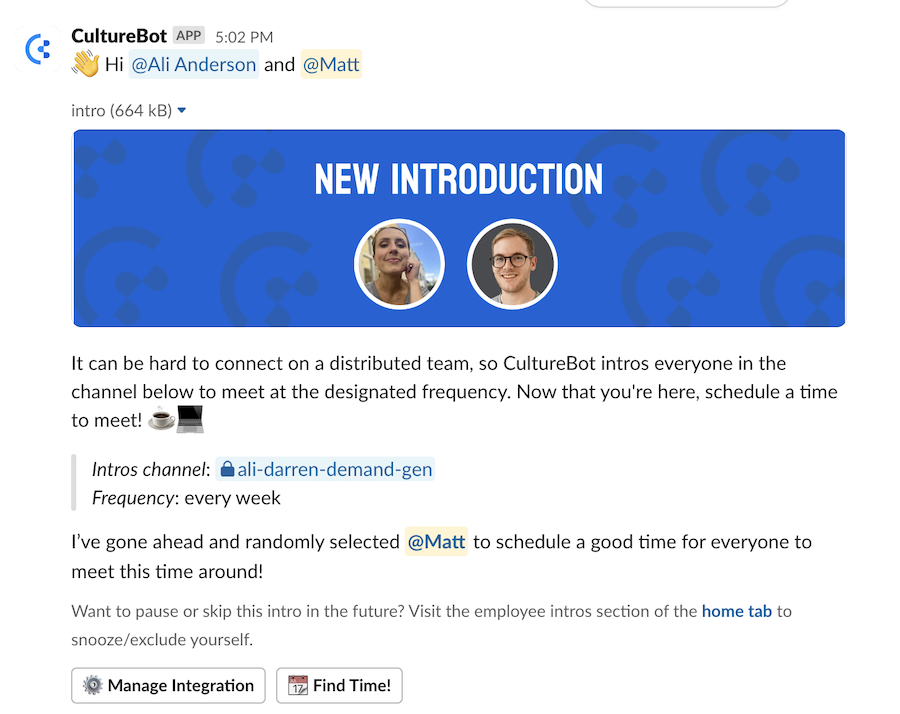
Source: CultureBot
2 — Create Fun Slack channels
Popular examples:
- #random: for whatever you need to talk about—anything off-topic, memes or jokes. This is a space for team members to discuss anything that falls outside of the traditional work conversation and breaks down barriers, allowing personalities to shine.
- #pets: pet owners love chatting about their furry babies. This channel not only sparks joy but also helps team members connect over shared interests in pets and animals.
- #hobbies: a channel dedicated to hobbies allows colleagues to discuss their interests outside of work, from photography to gardening or gaming. This can lead to discovering common interests and even forming hobby-based groups or activities.
- #wellness: create a space where team members can share tips on health, fitness, mindfulness, or even challenges they’re participating in, such as step counts or healthy eating. This promotes a culture of well-being and encourages everyone to support each other.

3 — Be Generous With GIFs
GIFs are an excellent way to inject humor into casual and tense conversations. Whether it’s a playful reaction to a colleague’s comment, a celebratory reaction to a project milestone, or a laughter-inducing GIF when chats are getting heated—these animated photos make conversations lively and personal.
When working remotely, we often communicate asynchronously. It’s not only cool to add visual touches to our conversations, it’s necessary. And GIFs are one visual touch that work.
4 — Play Trivia Games
In a trivia game, team members compete and collaborate in a fun setting. Real-time trivia sessions spark friendly competition and laughter, strengthening connections between remote team members.
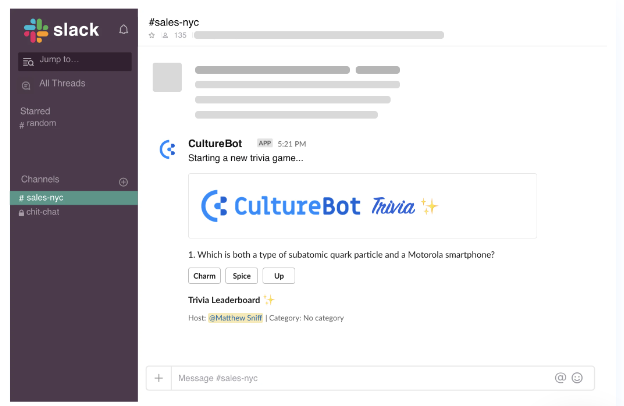
Source: CultureBot
5 — Host Virtual Events
Additionally, CultureBot can assist with virtual events, such as game nights or themed discussions. These mimic in-person events and provide a structured way for teams to socialize and unwind.
4 Proven Ways to Avoid Slack Burnout
With remote work, there’s always the pressure to stay connected virtually. But if replying to every #General message within thirty minutes is your goal, you can and will burn out in no time. You have to set healthy boundaries.
Below are four proven ways to avoid Slack burnout:
1 — Implement Slack-free Days
One way the team at PropertySaviour avoids Slack burnout is by implementing monthly ‘Slack-free’ days. For these Slack-free days, the team is encouraged to focus on deep work without the distraction of constant messages.
CEO, Saddat Abid shares that the practice has been particularly beneficial for his team of property analysts who require uninterrupted time for market research and financial modeling.
2 — Encourage the Use of Slack’s “Do Not Disturb” mode
Setting DND can also help. This status update lets team members signal to their colleagues when they’re unavailable. Respect your teammate’s DND mode and use the same as needed.
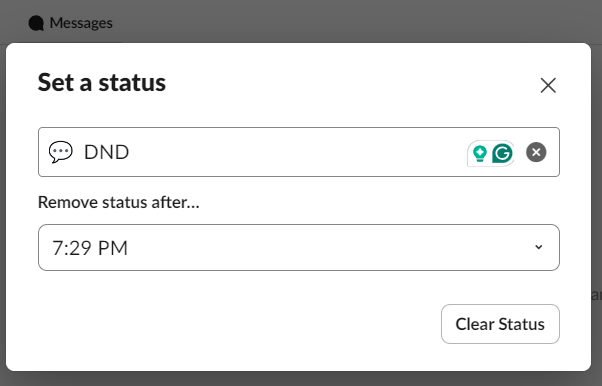
Source: Slack
3 — Mute Notifications Outside of Work Hours
This prevents work-related messages from seeping into personal time, allowing team members to recharge without feeling compelled to respond.
For Roland Jakob, Managing Partner at BlazeKin Media, encouraging the team to disconnect after work hours is key. “I’ve found that it’s important to set the tone early—make it clear that there’s no expectation for immediate replies after hours.”
4 — Promote Employee Wellbeing Within Slack
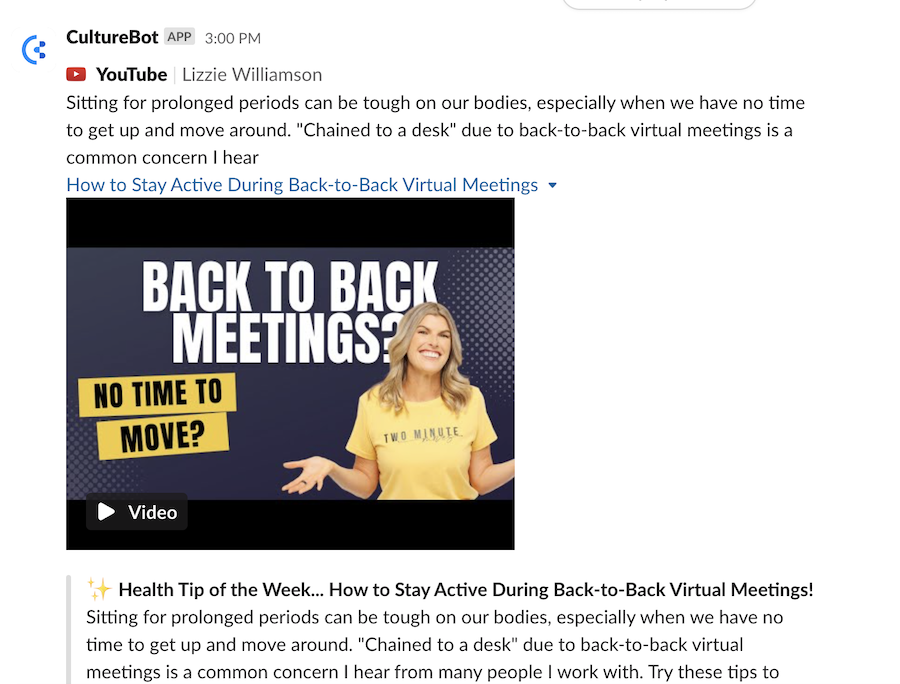
Actively champion employee wellbeing within the Slack app. CultureBot helps to do this by forwarding health resources and inspirational quotes to all teammates. These resources are peer-reviewed and can be customized to suit your team.
Example:
Source: CultureBot
Whether it’s sharing mindfulness exercises, promoting physical activity, or suggesting quick relaxation techniques, these resources encourage a more balanced approach to remote work.
Proven Ways to Use Slack for Seamless Project Management
Slack is one of the most well-known work communication tools for remote teams. However, although known as a communication platform, Slack is also an effective project management tool when used appropriately. With the right tools and strategies, project managers can keep teams productive and achieve their goals. Let’s explore how to reach that success by learning ways to use Slack for project management.
Why Slack is a Powerful Tool for Project Management
Slack’s organization tools for communication double as great project management opportunities. For example, being able to organize a workspace into channels isn’t only good for organizing discussions, it’s also great for organizing information about your project. For example, you might have a channel for a to do list or checklist and another channel for posting images for social media campaigns. Slack’s design encourages real time collaboration and file sharing.
Thanks to Slack’s integration tools with other applications, you can use it as the bridge between other powerful project management tools like Asana, Trello, and Teamwork. This enables your team to work with seamless task creation, organization, and updates. They can also help you set reminders in Slack so you can stay focused.
The best reminders are ones you don’t even have to think about setting. CultureBot’s celebrations and reminders keep projects on track while boosting your team’s morale, making it an essential tool in a project manager’s arsenal.
Tips for Staying Productive While Using Slack for Project Management
Here are a few tips to help you stay productive while using Slack to manage your project.
Establish Team Usage Guidelines
It’s important to establish guidelines for how your team should be using Slack. Try setting up a read only channel with a list of your guidelines. A few guidelines you might consider setting might be:
- Keep project discussions in relevant channels.
- Respond within a certain period of time.
- Make sure to set your notifications accordingly to receive important messages about the project.
Avoid Information Overload
Staying focused on your project means not getting overwhelmed by making lists and announcements. Try to keep things organized, tidy, and concise so that everyone understands what needs to be done and so they don’t get overwhelmed by details. Try to focus on the most important updates when making announcements.
Leverage Advanced Features
Become a power user to make your Slack experience more efficient. Try some of these tips:
- Use keyboard shortcuts for navigation.
- Text formatting can help with readability and emphasis in your announcements.
- Custom slash commands can give you the power to get all sorts of things done. CultureBot’s slash commands for employee feedback, surveys, and peer rewards can help you streamline project tasks and reward your team for their hard work.
Integrating Slack with Other Applications for Enhanced Project Management

Connecting Slack with other apps can provide a much more thorough project management experience. This works by adding the app to your workspace, usually through a link from the app developer’s website. You can also add applications from Slack’s app directory. Here’s how you get there:
- On desktop, click on the hamburger menu (three dots) on your left sidebar.
- Click Automations.
- Now, click App Directory at the top right corner.
Integrating applications provides a much easier workflow for transforming ideas into actionable tasks. Automations also allow real-time project updates for your team. Focusing more deeply on these tasks allows team members to become more aligned with clients. This integration also allows for more seamless sharing and organizing of project documents. Many great project management applications include Trello, Teamwork, and Asana.
CultureBot can complement Slack-Teamwork integration by fostering team engagement and alignment through features like water cooler conversations and mental health tips.
Real-World Example of Slack for Project Management

One real world example of Slack success for project management is Procore, a construction-industry SaaS platform. By synergizing their tech stack with Slack integrations and speped up internal communications, Procore can better achieve its project management goals. They leverage the power of automation tools in Slack to work with their partners and with stakeholders internally.
In the same way that Procore uses Slack Workflow Builder to automate tasks like welcoming partners to connection channels, your business can automate with other tools like CultureBot to welcome team members and celebrate advancing toward your project goals. In fact, Slack’s internal study claims that their users can save an average of 3.6 hours per week using platform automations.
Another great example of Slack’s use for project management is Australian supermarket chain Coles. Their ambitions for a seamless omni channel experience for customers in-store and online was realized thanks to Slack’s streamlined communications. They benefited greatly from monitoring automations that enabled better communication between engineering teams and other parts of the company. This allowed them to increase the pace of their product releases.
Potential Challenges and Solutions
There are a number of challenges that teams may face when using Slack as a project management tool. However, each challenge can be managed given a motivated team. Let’s take a look at those challenges and examine how to deal with them.
Information Overload
Without organization, Slack content can quickly spiral out of control. Continuous streams of messages can be difficult to catch up on. Self-discipline in taking notes during conversations isn’t the only way to deal with this. Using integrations with tools like Asana, Trello, and Teamwork are great for tracking tasks and keeping ideas in places that are easily accessible for your team.
Notification Management
According to Business of Apps in 2023, we get an average of 46 smartphone push notifications each day. Teams using Slack should be cautious about the value and purpose of their notifications, especially when sending notifications to more than one person at a time or the entire team. Not being consistent with where you mention specific colleagues can make it difficult for them to know which channels to monitor as well.
The solution to this problem is to establish clear guidelines to ensure that important messages are noticed, and less important messages don’t clutter up more important signals.
After-Hours Alerts
Separating work life balance or specifying emergency communications can be challenging with Slack. The best way to deal with work-life balance problems is to make sure that teams know when to mute notifications outside of work hours. Slack’s notification schedule is one way to approach this.
However, for certain critical projects, you may need notifications to push through in case of an emergency that occurs outside of work hours. One solution is to designate your emergency response team and create a special channel just for them that won’t get muted. That channel then only gets used if there’s an emergency that needs attention outside of work hours.
Resource Utilization
Similarly to the information overload problem, Slack can sometimes just be difficult to navigate efficiently. Without knowing what to do, time is easily wasted when searching for daily tasks and the right channels to communicate in. The best solution to this problem is for managers to update tasks and progress regularly and keep the whole team informed on the current status of the project and what to focus on next.
Measuring the Success of Your Remote Team’s Slack Usage
Pay attention to how your remote team uses Slack. To do this, track these key metrics:
- Channel engagement
- Employee satisfaction
- Response times
Monitoring channel engagement can help you decide which channels to keep, draw attention to, archive, or delete.
Putting an eye on response times helps you keep track of employees that are poor at communication. And on the flip side, those that maybe over communicate to the point of burnout.
CultureBot’s employee survey feature is a smart way to gather insights into employee satisfaction.
FAQs
Q: How can remote teams use Slack effectively?
A: Remote teams can use Slack effectively by setting clear guardrails around Slack usage and bringing the enthusiasm they would bring to in-person communication.
Q: What are some common Slack struggles for remote teams?
A: Some common Slack struggles remote teams face are notification fatigue, inability to turn off outside working hours, and difficulty forming bonds with teammates.
Q: How can Slack improve communication for remote teams?
A: Slack can improve communication in remote teams by providing a virtual office space. It also encourages low-pressure communication.
Q: What are the best practices for using Slack channels in remote teams?
A: Some Slack communication best practices for remote teams include starting essential channels, using descriptive channel names, and keeping separate channels for your internal and client teams.